Reading research in another language
How to translate a research paper and read it side by side
· LangBox
Machine translation is good enough to follow the argument of most papers, but not good enough to trust blindly. Terms of art get translated inconsistently, negations flip, and numbers inside tables drift. The safest way to read a paper in a language you don't fully command is with the original and the translation side by side, checking the original whenever a sentence matters.
Before you translate: check the PDF
- Is there real text? Select a sentence and paste it into a text editor. Published papers from journal sites and arXiv usually have a text layer. Scanned older papers may not; they need OCR (text recognition) first, and OCR mistakes then get translated too.
- Does the reading order survive? Copy a paragraph from a two-column page. If the lines come out interleaved, expect the translation of that page to be jumbled as well.
- Check the length and the parts you need. Many readers only need the abstract, introduction, method and discussion. Translating the references section costs time and credits and adds nothing.
A reading workflow that holds up
- Read the abstract in the original first. Even if you only catch half, it tells you what the key terms are before the translation renames them.
- Translate, then read the translation for structure. Use it to follow the argument section by section.
- Return to the original for every sentence you would quote or act on: claims, definitions, limitations and the numbers behind them.
- Keep a small glossary. Write down each key term in the original language with the translation you have settled on. Machine translation often renders the same term two or three different ways in one paper.
What to verify against the original
- Negations and hedges: "not significant", "no evidence of", "may", "suggests". A dropped word reverses the finding.
- Numbers and units: effect sizes, p-values, sample sizes, decimal separators and units, especially inside tables.
- Tables and figures: check every cell against its row and column headings. Translated tables can lose alignment even when each word is right.
- Formulas: treat any formula in a translated page as unverified and read it from the original.
- Citations: author names, years and reference numbers should be unchanged. If a citation looks translated, use the original.
Doing it in LangBox
LangBox's PDF reader translates an uploaded PDF page by page in the cloud and shows each finished page next to the original, so the comparison above is one glance rather than two windows.
- It accepts PDFs up to 100 MB with no page limit, and one account runs one PDF job at a time.
- Pages appear as they finish. You can start reading the introduction while the rest of the paper is still being translated, and switch between the bilingual view and a translated-only view.
- Pages without a text layer can use OCR, with the caveats above.
- It needs a LangBox account and model credits.
- Use the browser-based PDF translator with a free account and available credits. Upload the PDF file directly; reference-manager integration is not supported. Download your output within 24 hours.
- There is no Zotero or reference-manager integration: you upload the PDF file itself.
A practical check for two-column research PDFs
Before translating a full research paper, test a single page that includes two columns, a table, and a formula. Check the reading order, terminology, numbers, and citation markers against the source PDF. The diagnostic fixture below shows how columns and a table behave on a text page and a matching scan; it is not an academic paper and does not test formula handling. When translating your own paper, verify every formula and citation against the original.
Compare real PDF inputs and outputs
These are archived LangBox production results from 20 September 2026, not fresh benchmark runs. Open the original and unedited output side by side. Use the examples below to judge whether the output suits your document.
Two columns and a small table
Page 1 of the layout fixture contains selectable text, two columns, and a synthetic table. In the unedited Chinese output, paragraphs stay separate and the values 9 feet and 12 km remain visible. One translated unit wraps awkwardly. This diagnostic fixture is not an academic paper.
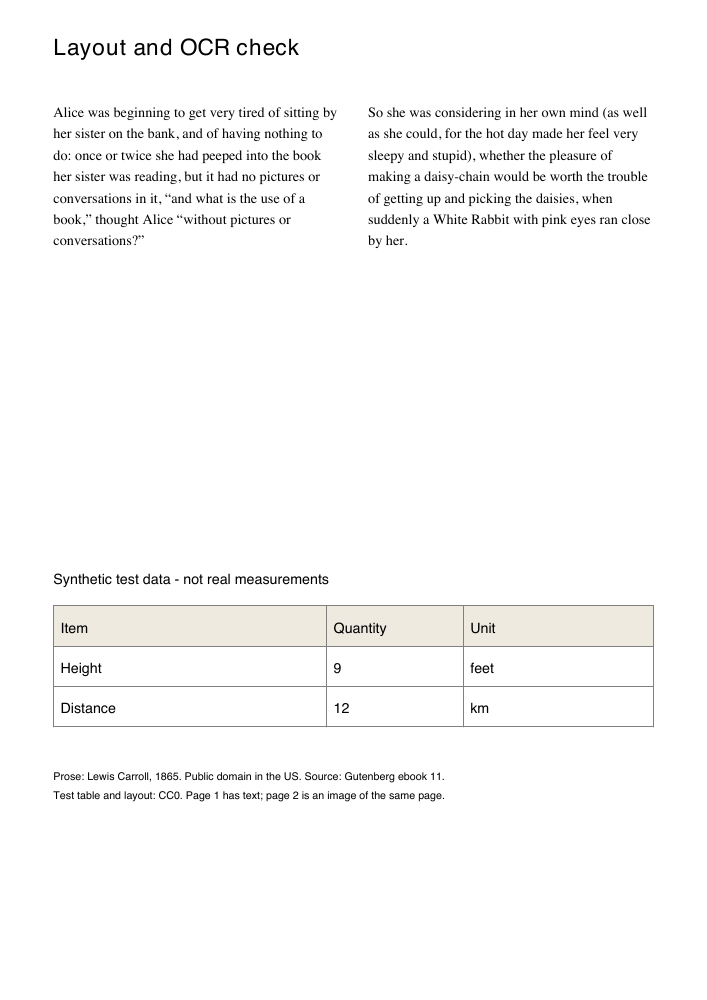
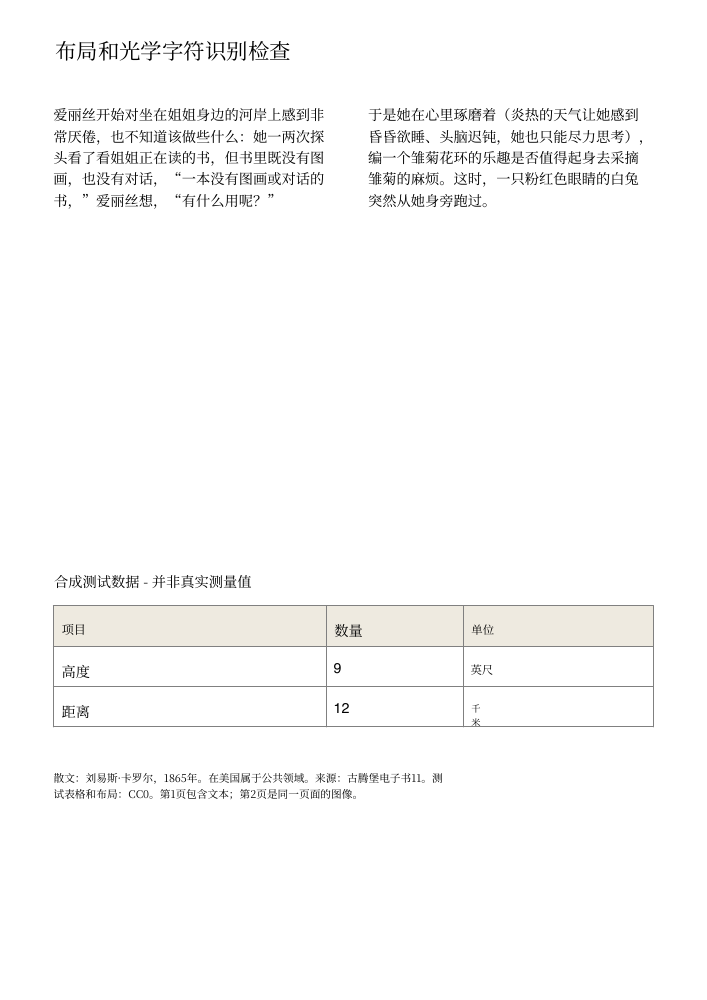
Click either page to open the PDF. The source and output shown come from the same archived test.
Check these details before trusting a result
Compare names, negations, decimal points, units, table cells, and formulas against the original. A completed job does not guarantee these details are right. PDF translation requires a free account and credits, accepts files up to 100 MB with no page limit, and allows one active PDF job per account. Downloads remain available for 24 hours.
Test date, method, and limitations (English)Unpublished work and privacy
Any online translator, including LangBox, receives the document you upload. For a manuscript under review, a confidential report or a paper you were sent privately, check your institution's or the journal's policy first, and use a local tool or an approved service if in doubt. Published papers you are allowed to download are the low-risk case.