Comparison
Google Translate PDF alternative: Palingo compared
Updated · Written by Palingo, so read it as a vendor's comparison
Google Translate's web Documents tab translates uploaded PDFs up to 10 MB and 300 pages for free on desktop computers and returns a downloaded translated file. Palingo is built for demanding PDFs—arXiv papers, automotive service manuals, financial reports, and scanned contracts—up to 100 MB and 100 pages when signed in, keeping two-column layouts, formulas, tables, and diagrams aligned in a live side-by-side reader across desktop and mobile browsers.
Features of Google Translate are listed only as its own site or store listing describes them; where it does not describe a feature, the table says so instead of guessing.
10 MB single-file download vs. 100 MB side-by-side PDF and EPUB study
Choose based on your file size, device, and what you want to do after uploading. If you just need a quick download on a desktop computer for a short PDF, Word, or PowerPoint file under 10 MB, Google Translate's Documents tab works out of the box. If your PDFs exceed 10 MB (academic monographs, scanned manuals, textbooks up to 100 MB), if you are uploading from a phone browser, or if you want original and translated pages side by side with double-click word lookups and EPUB reading, Palingo is built for that workflow.
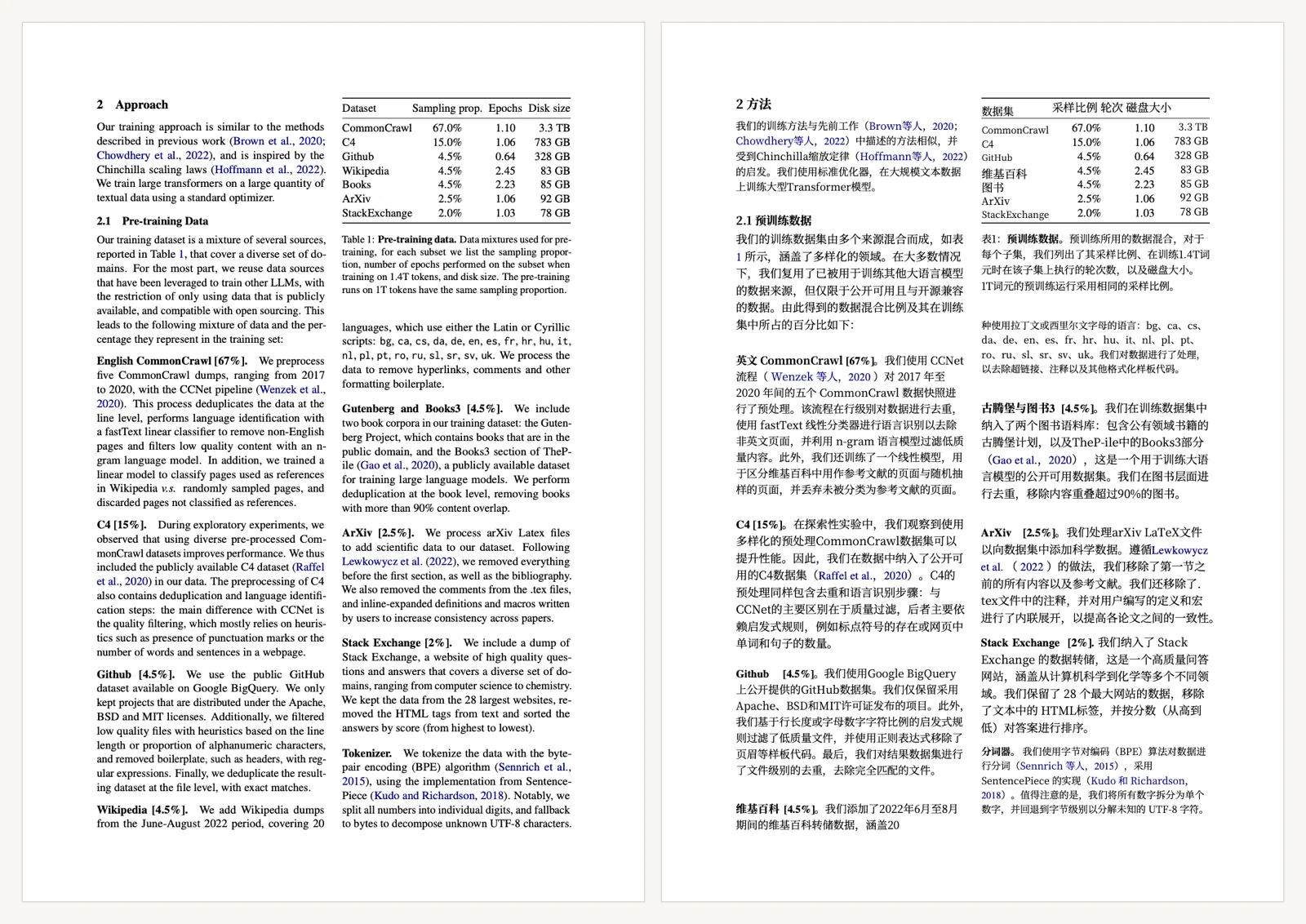
Real unedited Palingo PDF output
At a glance
| Google Translate | Palingo | |
|---|---|---|
| PDF file size limit | Up to 10 MB (suggests Cloud Translation API for larger files) | Up to 100 MB per PDF |
| Page limit | 300 pages or less | First 20 pages of 10 PDFs/24h without an account; up to 100 pages per PDF signed in with credits |
| Layout & reading view | Downloads a translated file; no side-by-side web reader described | Preserves 2-column layouts, formulas, tables, and diagrams in a side-by-side browser reader, plus bilingual or translated PDF download |
| Mobile browser upload | Desktop browsers only ('not supported on smaller screens or mobile') | Works in desktop and mobile browsers |
| EPUB ebooks | Not supported (.docx, .pdf, .pptx, .xlsx only) | Yes: bilingual EPUB reader up to 100 MB and full-book export under 10 MB |
| Dictionary & saved words | Not described on the document translation help page | Double-click contextual word lookup, saved word list, spaced review, and Anki export |
| Price | Free consumer web tool; Cloud Translation API billed separately | Free plan (1M guest / 3M account credits every 30 days); paid Pro ($5.99/mo) and Ultra ($14.99/mo) plans |
Choose Google Translate if…
- You want an instant, no-account download for a short PDF, DOCX, PPTX, or XLSX file under 10 MB across Google Translate's 100+ languages on a computer.
- You already use Google Cloud Translation API in an engineering pipeline for batch documents.
Choose Palingo if…
- Your arXiv paper, automotive repair manual, textbook, or report PDF exceeds 10 MB (up to 100 MB) or you want to start reading on a phone browser.
- You need two-column prose, LaTeX equations, torque tables, and technical diagrams preserved cleanly with the original page beside the translation.
- You also read EPUB ebooks or want double-click word lookups, saved vocabulary, and Anki export in one place.
Palingo scope and free plan limits
Palingo's web PDF and EPUB tools work in both desktop and mobile browsers. On the free plan, guests get 1M credits every 30 days and can read the first 20 pages of up to 10 PDFs every 24 hours; signed-in free accounts receive 3M credits every 30 days and can translate up to 100 pages per 100MB PDF with 24-hour downloads (Pro and Ultra raise limits). Full EPUB export handles DRM-free text under 10MB without preserving covers, images, or complex layouts.