Comparison
Naver Papago PDF alternative: Palingo compared
Updated · Written by Palingo, so read it as a vendor's comparison
Naver Papago is widely used in Korea and Japan for Korean, Japanese, English, and Chinese document translation (.pdf, .docx, .xlsx, .pptx, .hwpx), with a 20 MB / 20,000-character free tier cap (20 documents a month) and paid Papago Plus tiers up to 100 MB / 300,000 characters. Palingo fits longer academic papers, technical manuals, and scanned PDFs where you want up to 100 MB on a monthly free credit tier, side-by-side formula and table inspection, OCR on image-embedded text, and Anki vocabulary export.
Features of Naver Papago are listed only as its own site or store listing describes them; where it does not describe a feature, the table says so instead of guessing.
20 MB quick document replacement vs. 100 MB side-by-side papers and OCR
Naver Papago is a practical choice when you translate short Hangul (.hwpx) or Office documents under 20,000 characters on its free tier, or already subscribe to Papago Plus. However, Papago Help explicitly notes that text inside images within documents is not translated, and free PDFs cap at 20 MB and 20,000 characters. Choose Palingo when your research paper, datasheet, or car repair manual reaches 100 MB, includes scanned image text that needs OCR, or requires side-by-side verification of equations, torque tables, and vocabulary flashcards.
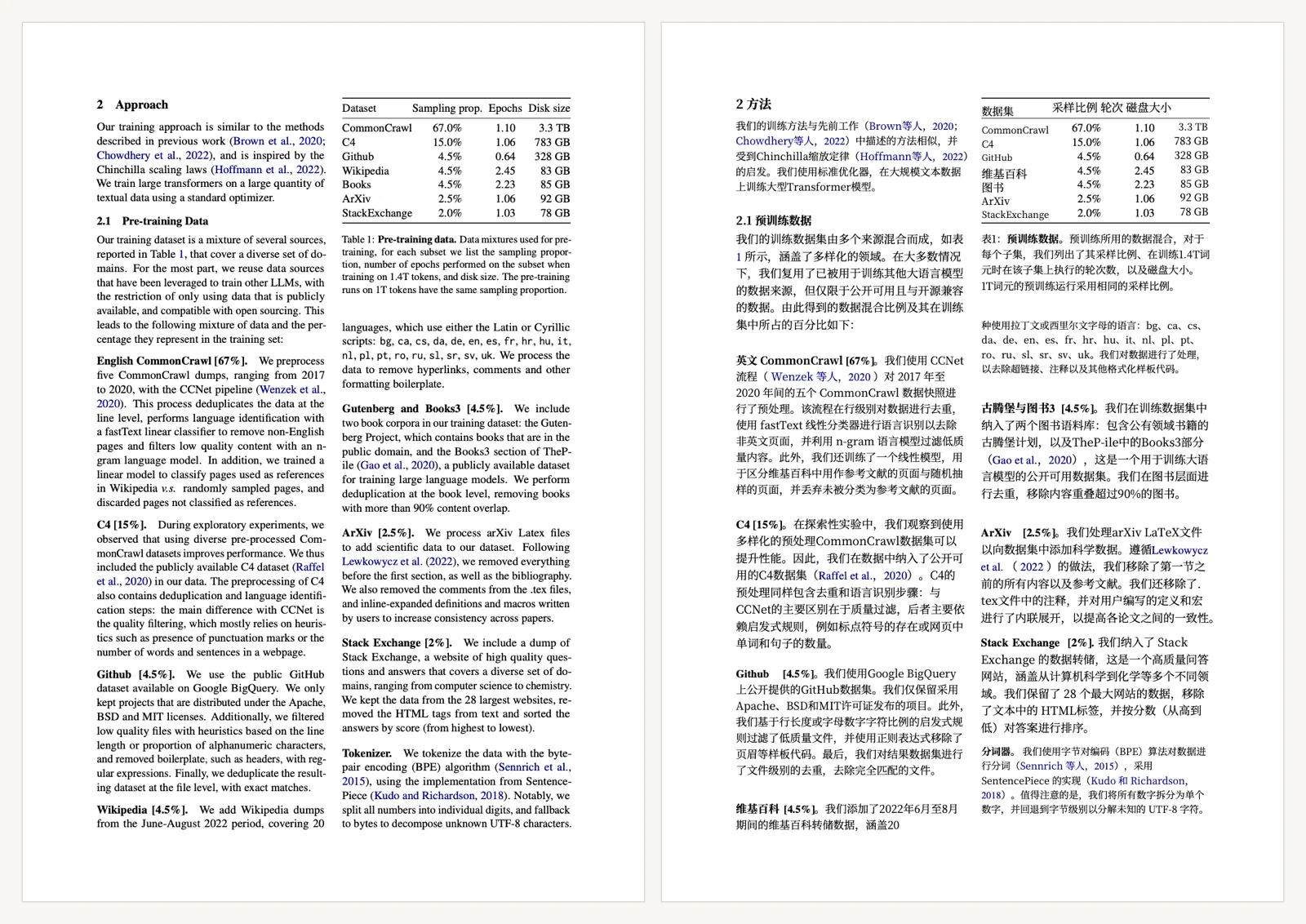
Real unedited Palingo PDF output
At a glance
| Naver Papago | Palingo | |
|---|---|---|
| Free-tier PDF limit | 20 MB, 20,000 characters, and 20 documents a month on standard web | 10 files/24h (first 20 pages) without an account; 100 MB & 100 pages per PDF signed in (3M credits/30 days) |
| Layout & reading view | Generates a translated file stored for 7 days; no live side-by-side web comparison reader | Preserves 2-column layouts, LaTeX math, tables, and diagrams in a side-by-side reader, plus bilingual or translated PDF download |
| Text inside images & scans | Papago Help states text embedded inside document images is not translated; native PDFs recommended | Automatic per-page OCR extracts and translates text on scanned pages and image-only PDFs |
| Office & Hangul (.hwpx) | Supports .pdf, .docx, .xlsx, .pptx, and .hwpx | Supports .pdf and .epub/.mobi/.azw3; no .hwpx or Office file support |
| EPUB & vocabulary study | Not part of Papago document translation | Bilingual EPUB reader (100 MB) and export (<10 MB), double-click dictionary, spaced review, and Anki export |
| Paid tiers | Papago Plus (Basic ~$9.99/mo for 30 docs; 100 MB / 300,000-char cap across paid tiers) | Pro ($5.99/mo, 30M credits, 1,000 pages) and Ultra ($14.99/mo, 80M credits, unlimited pages) |
Choose Naver Papago if…
- You translate Hangul (.hwpx), Word, Excel, or PowerPoint files under 20,000 characters and already use Naver Papago's workspace.
- You only need a quick single-language replacement file and do not translate formulas, dense tables, or scanned images.
Choose Palingo if…
- Your paper or workshop manual exceeds Papago's 20 MB / 20,000-character free limit (up to 100 MB and 100 free pages per PDF in Palingo).
- You read scanned PDFs or technical papers and need automatic OCR plus side-by-side verification for math, p-values, and torque figures.
- You also want to study EPUB books, look up words in context, and export saved terms to Anki.
Palingo scope and free plan limits
Palingo runs directly in desktop and mobile browsers without installing desktop software. Guests get 1M credits every 30 days and can read the first 20 pages of up to 10 PDFs every 24 hours; signed-in free accounts get 3M credits every 30 days for up to 100 MB and 100 pages per PDF (kept 24 hours for download; Pro $5.99/mo raises to 1,000 pages and Ultra $14.99/mo removes page caps). Palingo supports .pdf and .epub/.mobi/.azw3, and does not translate .hwpx or Microsoft Office files.